
Google Removes Q&A from Business Profiles: Now What?
Google has removed the Q&A section from Business Profiles and replaced it with AI-generated answers in Maps. Learn how this update affects your visibility and what property business owners should do to stay competitive.
GET LEADSSEO
Lauren Poling
12/9/20255 min read
At Realty Streamliners, we’ve helped high-performing property business owners like you for years, so we know what works. Google's recent removal of the Q&A feature from Business Profiles and rollout of the new "Ask Maps" AI tool is more than a minor update. It redefines how your potential clients interact with your Google presence, and how Google ranks you in local search.
Here’s what’s changed, and how to turn it into an opportunity.
What’s Changed: From Manual Q&A to AI-Generated Responses
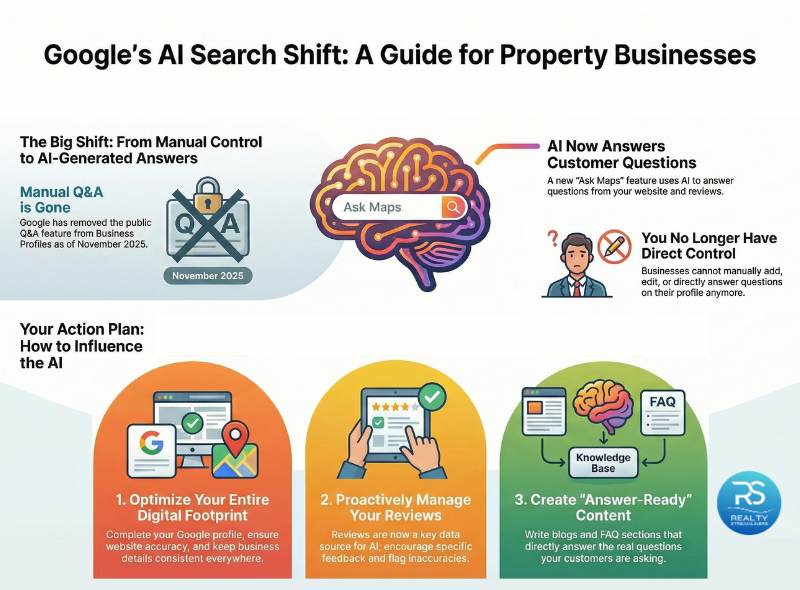
In November 2025, Google phased out the public Q&A section on Business Profiles. It's been replaced with a new “Know Before You Go” section within Google Maps, where users can now ask questions directly. Google’s AI then generates an answer by pulling from trusted sources like your website, Business Profile, reviews, and other public data.
You no longer control the answers manually, but you can influence what gets pulled in.
Why This Is Good News, If You’re Ready
Google favors detailed, structured content
Property businesses with accurate, rich, and well-organized content are more likely to have their information used in AI responses. If your website and GBP are already built on strong service descriptions, location details, and FAQs, you’re positioned to benefit.
More visibility, faster actions
AI responses allow users to see answers quickly, often without clicking through. This can increase direct calls, messages, or visits, provided your information is correct.
A new layer of SEO: Answer Engine Optimization
We’re moving from search engine optimization (SEO) to answer engine optimization (AEO). When you anticipate and answer real questions in your content, Google is more likely to trust and feature your business in its AI answers.
What You Can’t Do Anymore
Add or manage Q&A content manually on your Google Business Profile
Control which questions are answered or how
Vote or respond directly to public questions

What You Should Do Now
1. Optimize your GBP and website content
Complete every field in your profile: business description, services, categories, hours, products, and media
Ensure your website reflects accurate, up-to-date service information
Use structured data markup (such as FAQ schema) to help Google’s AI understand your content clearly
2. Monitor and manage reviews
Reviews now play a bigger role in shaping how AI sees your business. Be sure to:
Encourage specific, helpful reviews that mention services, staff, and amenities
Regularly check your reviews for inaccurate or misleading information
Flag and report any reviews that include false details to prevent bad data from influencing AI responses
3. Keep your data consistent everywhere
Make sure your business name, address, and phone number are identical across your website, Google Business Profile, and other platforms. Inconsistencies can damage your trustworthiness in Google's eyes.
4. Keep building content that answers real questions
Content is no longer just for SEO; it's now the backbone of your AI visibility. That means:
Continue publishing blogs that address real user questions, especially “how,” “when,” or “can I” style queries
Add clear FAQ sections to every blog (we include these as part of our SEO strategy at Realty Streamliners) to support both users and Google's AI
Use tools like AnswerThePublic.com to find out what people are asking, then create content that answers those questions in detail
Can You See What Users Are Asking?
Not directly. Google currently does not report the specific questions being asked or show where your business was featured in an answer. However, you can monitor indirect signals like:
Increases in calls or direction requests from your profile
Shifts in the types of reviews or inquiries you receive
Changes in organic website traffic from local search queries
Over time, these indicators can help you understand if your content is being used in AI responses.
So, Is This Good or Bad for Your Property Business?
If you’ve been investing in content, reviews, and profile optimization, this is a strong opportunity to get ahead. But if your digital presence is inconsistent or sparse, AI-generated answers may skip over your business entirely, or worse, share incorrect information from third-party sources.
That’s why more property business owners are turning to Realty Streamliners to simplify their systems and generate inbound leads. We build the kind of structured content and digital trust that Google’s AI can understand and prioritize.
Frequently Asked Questions
What happened to the Q&A section on Google Business Profiles?
Google officially removed the Q&A feature from Business Profiles in November 2025. It has been replaced by an AI-powered “Ask a question” box in Google Maps, where users can type questions and receive AI-generated responses based on your website, Business Profile, and publicly available information.
Can I still answer questions directly on my Business Profile?
No. You can no longer add or manage questions and answers manually. Google's AI now generates answers automatically, and businesses do not have direct control over what it says.
Is this change good or bad for my visibility?
It depends on how well your online presence is optimized. Businesses with accurate, structured, and helpful content are more likely to be featured in AI responses. If your information is sparse, outdated, or inconsistent, your visibility may suffer.
How can I influence what Google’s AI shows in its answers?
While you can’t control the AI directly, you can improve your chances by:
Keeping your Google Business Profile complete and accurate
Adding FAQ sections to your website and blog posts
Using structured data (like FAQ schema) to help Google understand your content
Maintaining consistency across all your online listings
Can I see what users are asking through Ask Maps?
Not at this time. Google does not report which questions are being asked or whether your business is being cited in AI-generated answers. However, you can monitor engagement trends and content performance to infer impact.
How can I measure the effectiveness of AI-generated answers, and what KPIs should I track?
Although direct tracking is not available, the following KPIs can help you gauge visibility and engagement:
Profile engagement: Calls, website clicks, messages, and direction requests from your Business Profile
Organic search traffic: Especially traffic from long-tail or question-based queries
Search Console insights: Impressions and clicks on FAQ or blog content
Local visibility trends: Appearances in map results and local packs tied to service-related queries
What if the AI gives incorrect answers about my business?
Start by identifying where the wrong data may be coming from: your profile, website, or third-party sources. Update any outdated information and report inaccurate reviews if they contain false claims. Keeping your content accurate and consistent is your best defense.
How can I create content that performs well in AI answers?
Focus on content that mirrors real user questions. Use natural language, keep your answers concise and helpful, and include clear FAQ sections in every blog or service page. Tools like AnswerThePublic.com can help you discover trending questions to address.
Ready to Lead in Google’s AI Search?
Google’s update signals a long-term shift. To win visibility now, property businesses must build trust through consistent, structured, question-driven content, and monitor their online reputation more closely than ever.
Ready to rank higher on Google and streamline your workflow? Contact Realty Streamliners today.